
[PART11.입출력 기본(5/7)] StreamReader · StreamWriter — 큰 파일을 한 줄씩 다루는 정석
File.* 정적 메서드의 한계를 넘어가는 시점 / TextReader·TextWriter 추상 클래스 위에 올라가는 wrapper / 4KB 버퍼링·BOM 자동 감지 / leaveOpen으로 stream 수명 분리 / Unity 모바일에서 한 줄마다 string이 만들어지는 비용
목차
1. 문제 제기 — 100MB 로그 파일을 통째로 메모리에 올릴 수 없다
File.ReadAllText / File.ReadAllLines는 코드 한 줄에 모든 일을 처리해 주는 편의 메서드이지만, 파일이 커지면 그 자체가 OOM(OutOfMemoryException) 원인이 됩니다. 모바일 환경에서 100MB짜리 게임 로그 파일을 통째로 메모리에 올리는 건 사실상 불가능합니다.
// ❌ 100MB 로그 파일 → 100MB+ 힙 사용 → OOM 가능
string[] lines = File.ReadAllLines(bigLogPath);
이때 등장하는 것이 StreamReader와 StreamWriter입니다. 이 두 클래스는:
- 한 줄·한 글자씩 읽어 처리한 뒤 폐기할 수 있게 해 주고,
- 인코딩과 버퍼 크기를 직접 제어할 수 있게 해 주고,
FileStream같은 하위 스트림과 분리되어, 같은 파일에 여러 reader/writer를 붙일 수 있게 해 줍니다.
이 글에서는 StreamReader/StreamWriter가 사실 무엇 위에 서 있고, 내부 버퍼링·BOM 감지·Dispose 동작이 어떻게 구성되는지를 IL 레벨에서 확인하고, Unity 모바일 핫패스에서 한 줄마다 새 string을 만드는 비용을 어떻게 다룰지를 정리합니다.
2. 개념 정의 — TextReader/TextWriter의 구체 구현
2.1 추상 클래스와 구체 구현
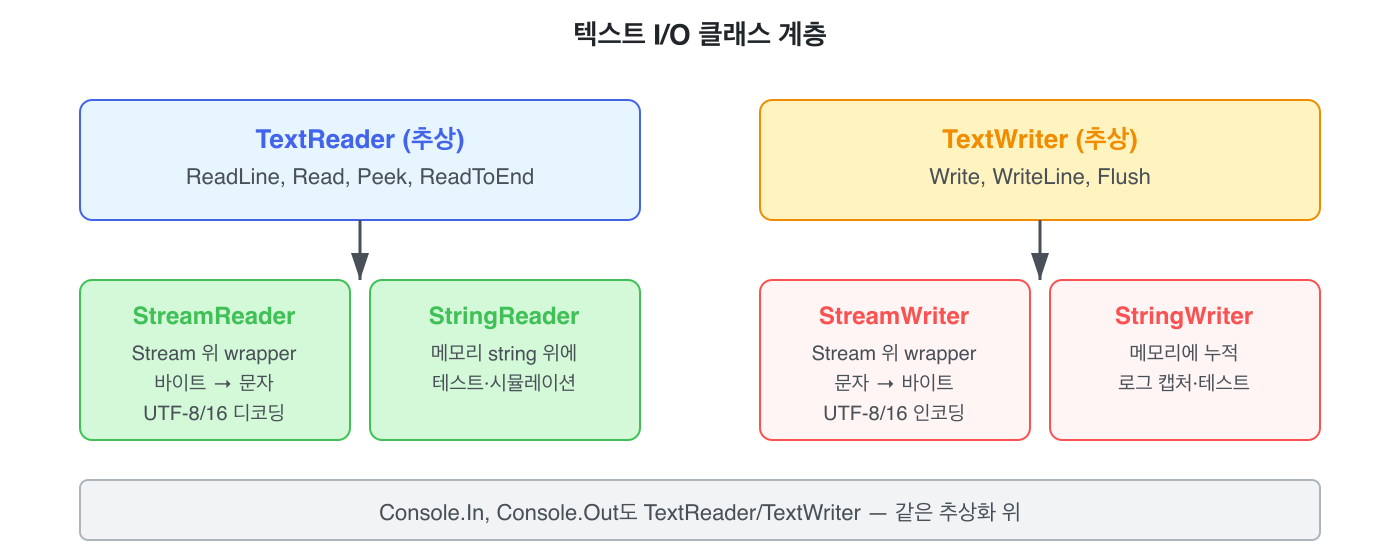
StreamReader/StreamWriter는 Stream(바이트 단위)과 TextReader/TextWriter(문자 단위) 사이에 끼어 인코딩 변환을 담당합니다.
| 클래스 | 무엇을 감싸는가 | 누가 만들어 주는가 |
|---|---|---|
StreamReader |
Stream (예: FileStream) |
new StreamReader(path) 또는 File.OpenText(path) |
StreamWriter |
Stream (예: FileStream) |
new StreamWriter(path) 또는 File.CreateText(path) |
StringReader |
string |
new StringReader(text) |
StringWriter |
내부 StringBuilder |
new StringWriter() |
2.2 가장 흔한 패턴 — using + ReadLine 루프
using StreamReader reader = new StreamReader(path);
string? line;
while ((line = reader.ReadLine()) != null)
{
    Process(line);
}File.ReadLines와 거의 같은 일을 하지만, 인코딩·버퍼 크기·FileShare 같은 옵션을 직접 제어할 수 있다는 차이가 있습니다.
2.3 StreamWriter — 쓰기 측
using StreamWriter writer = new StreamWriter(path);
writer.WriteLine("[INFO] 게임 시작");
writer.WriteLine($"[INFO] 플레이어: {playerName}");
// using 종료 시 자동 Flush + DisposeWriteLine은 Console.WriteLine과 똑같은 인터페이스(TextWriter)라, 같은 코드를 콘솔 출력과 파일 저장 양쪽에 쓸 수 있습니다.
TextWriter target = useFile
    ? new StreamWriter("log.txt")
    : Console.Out;

target.WriteLine($"[INFO] 게임 시작");   // 둘 다 작동
3. 내부 동작 — 버퍼링과 자동 BOM 감지
3.1 4KB 버퍼링

StreamReader의 기본 버퍼는 1024 char(2KB) 크기입니다(StreamReader 생성자의 bufferSize 매개변수 기본값). 하위 FileStream도 4KB 버퍼를 갖고 있어, ReadLine 한 번 호출에 디스크 시스템 콜이 발생하지 않습니다. 디스크 → FileStream 4KB → StreamReader 1024 char → 앱 한 줄, 이렇게 두 단계 버퍼를 거쳐 들어옵니다.
이 구조 덕분에 큰 파일도 한 줄씩 효율적으로 읽을 수 있지만, ReadLine 호출마다 새 string이 만들어진다는 점은 변하지 않습니다. Unity 모바일 핫패스에서 누적되면 GC 압박이 됩니다.
3.2 BOM 자동 감지
StreamReader는 인자 없이 만들면 파일의 첫 몇 바이트를 보고 인코딩을 자동 추정합니다.
// 인코딩 미지정 → BOM 검사 → UTF-8 / UTF-16 자동 결정
using StreamReader r = new StreamReader(path);

// 명시적 강제
using StreamReader r2 = new StreamReader(path, Encoding.UTF8);

// 자동 감지 끄기
using StreamReader r3 = new StreamReader(
    path,
detectEncodingFromByteOrderMarks: false);| BOM 바이트 | 감지된 인코딩 |
|---|---|
EF BB BF |
UTF-8 |
FF FE |
UTF-16 (LE) |
FE FF |
UTF-16 (BE) |
00 00 FE FF |
UTF-32 |
| (없음) | 기본 UTF-8 |
자동 감지는 편리하지만, 잘못된 BOM이 포함된 파일을 만나면 글자가 깨집니다. 데이터 형식이 정해진 환경(서버 통신·로그)에서는 인코딩을 명시하는 편이 안전합니다.
3.3 ReadLine 루프의 IL
public static int CountWithStreamReader(string path)
{
    int count = 0;
    using StreamReader reader = new StreamReader(path);
    string? line;
    while ((line = reader.ReadLine()) != null)
    {
        count++;
    }
    return count;
}.method public hidebysig static int32 CountWithStreamReader (string path) cil managed
{
.maxstack 2
.locals init (
[0] int32, // count
[1] class StreamReader, // using 변수
[2] string,
[3] bool,
[4] int32
)
IL_0001: ldc.i4.0
IL_0002: stloc.0
IL_0003: ldarg.0
IL_0004: newobj instance void StreamReader::.ctor(string) // ★ 단일 인자 생성자
IL_0009: stloc.1
.try
{
// loop start
IL_000c: nop
IL_000d: ldloc.0
IL_000e: ldc.i4.1
IL_000f: add
IL_0010: stloc.0
IL_0012: ldloc.1
IL_0013: callvirt instance string TextReader::ReadLine() // ★ TextReader 가상 메서드
IL_0018: dup
IL_0019: stloc.2
IL_001a: ldnull
IL_001b: cgt.un
IL_001d: stloc.3
IL_001e: ldloc.3
IL_001f: brtrue.s IL_000c
IL_0021: ldloc.0
IL_0022: stloc.s 4
IL_0024: leave.s IL_0031
}
finally
{
IL_0026: ldloc.1
IL_0027: brfalse.s IL_0030
IL_0029: ldloc.1
IL_002a: callvirt instance void IDisposable::Dispose() // ★ 자동 해제
IL_002f: nop
IL_0030: endfinally
}
IL_0031: ldloc.s 4
IL_0033: ret
}3.4 IL 분석 포인트
1. callvirt instance string TextReader::ReadLine() — 가상 디스패치
컴파일러가 StreamReader::ReadLine이 아니라 부모 클래스인 TextReader::ReadLine을 가상 호출합니다. 같은 코드를 StringReader나 Console.In 같은 다른 TextReader 구현으로 바꿔도 그대로 동작하는 다형성의 흔적입니다.
2. using 선언 → .try { } finally { Dispose() }
File.* + using FileStream과 동일한 패턴. 예외가 던져져도 Dispose는 반드시 호출되어 버퍼에 남은 내용을 디스크에 flush + 파일 핸들 해제까지 처리합니다.
3. dup → stloc → ldnull → cgt.un — 한 줄짜리 null 검사
while ((line = reader.ReadLine()) != null) 구문의 IL 변환. 스택 위의 ReadLine 결과를 dup으로 한 번 더 복제해 한쪽은 변수에 저장, 한쪽은 null 비교에 사용합니다. (이 패턴은 PART 11-2에서도 다뤘습니다.)
3.5 leaveOpen — Stream 수명 분리
public static void WriteWithLeaveOpen(FileStream fs, string text)
{
    using StreamWriter writer = new StreamWriter(
        fs,
        Encoding.UTF8,
        bufferSize: 1024,
        leaveOpen: true);   // ★ writer.Dispose()가 fs는 안 닫음
    writer.WriteLine(text);
}IL_0001: ldarg.0 // fs (FileStream)
IL_0002: call class Encoding Encoding::get_UTF8() // Encoding.UTF8
IL_0007: ldc.i4 1024 // bufferSize
IL_000c: ldc.i4.1 // ★ leaveOpen = true
IL_000d: newobj instance void StreamWriter::.ctor(Stream, Encoding, int32, bool)
IL_0012: stloc.0
.try
{
IL_0013: ldloc.0
IL_0014: ldarg.1
IL_0015: callvirt instance void TextWriter::WriteLine(string)
IL_001b: leave.s IL_0028
}
finally
{
IL_0020: ldloc.0
IL_0021: callvirt instance void IDisposable::Dispose() // writer만 해제
}4. leaveOpen: true (ldc.i4.1)의 의미
기본값은 false입니다. StreamWriter.Dispose()가 호출될 때 자기 자신뿐만 아니라 감싸고 있는 Stream(예: FileStream)까지 같이 닫습니다. 외부에서 FileStream을 만들어 두 개의 writer를 차례로 붙이고 싶다면 leaveOpen: true로 명시해, StreamWriter가 자신의 수명을 다해도 하위 stream은 살려둬야 합니다.
// ✅ leaveOpen 활용 — 같은 FileStream에 두 번 쓰기
using FileStream fs = new FileStream("out.txt", FileMode.Create);

using (StreamWriter w1 = new StreamWriter(fs, Encoding.UTF8, 1024, leaveOpen: true))
{
    w1.WriteLine("[헤더]");
}
// w1은 닫히지만 fs는 살아 있음

using (StreamWriter w2 = new StreamWriter(fs, Encoding.UTF8, 1024, leaveOpen: true))
{
    w2.WriteLine("[본문]");
}

fs.Flush();   // 명시적 flush
4. 실전 적용 — Before/After 패턴
4.1 큰 로그 파일을 메모리에 올리지 말 것
// ❌ Before — 100MB 로그를 string[]로 통째 적재
public static int CountErrors(string path)
{
    string[] lines = File.ReadAllLines(path);
    return lines.Count(l => l.Contains("[ERROR]"));
}// ✅ After — StreamReader로 한 줄씩
public static int CountErrors(string path)
{
int count = 0;
using StreamReader reader = new StreamReader(path);
string? line;
while ((line = reader.ReadLine()) != null)
{
if (line.Contains("[ERROR]")) count++;
}
return count;
}
// ✅ Alternate — File.ReadLines (위와 동일한 효과, 코드 더 짧음)
public static int CountErrorsLinq(string path)
=> File.ReadLines(path).Count(l => l.Contains("[ERROR]"));File.ReadLines는 내부적으로 StreamReader를 감싼 wrapper입니다. 세밀한 옵션이 필요 없으면 File.ReadLines 가, 인코딩·FileShare·버퍼 크기 등을 직접 제어해야 하면 StreamReader 직접 사용이 정답입니다.
4.2 동시 접근 — FileShare 명시 + StreamReader 주입
// ❌ Before — 다른 프로세스가 로그 파일을 읽는 도중 쓰기 시도하면 IOException
using StreamReader reader = new StreamReader(logPath);// ✅ After — FileStream으로 FileShare를 직접 제어
using FileStream fs = new FileStream(
logPath,
FileMode.Open,
FileAccess.Read,
FileShare.ReadWrite); // 다른 프로세스의 읽기·쓰기 모두 허용
using StreamReader reader = new StreamReader(fs);
string? line;
while ((line = reader.ReadLine()) != null)
{
Process(line);
}File.OpenText 단축 메서드는 내부적으로 FileShare.Read만 허용합니다. 로그 파일을 실시간 모니터링해야 하는 도구라면 위처럼 FileStream을 직접 만들어야 합니다.
4.3 인코딩 명시 — 다국어·서버 통신 데이터
// ❌ Before — 서버에서 내려온 UTF-8 (BOM 없음) 파일이 글자 깨짐
using StreamReader reader = new StreamReader(path);   // BOM이 없으면 자동감지 fallback

// ✅ After — 인코딩 명시
using StreamReader reader = new StreamReader(path, Encoding.UTF8);
자동 감지는 BOM이 없으면 .NET 기본인 UTF-8로 떨어지지만, 환경마다 다른 결과가 나오는 변수가 생깁니다. 데이터 형식을 알고 있다면 명시하는 편이 안전합니다.
4.4 AutoFlush — 로그 파일에서만 쓰는 옵션
// 일반적으로 AutoFlush=false (기본값) — 버퍼에 누적 후 한 번에
using StreamWriter writer = new StreamWriter(path);
for (int i = 0; i < 1000; i++) writer.WriteLine(i);
// using 끝에서 1번만 디스크 쓰기

// 로그 파일은 AutoFlush=true — 매 줄마다 디스크 flush
using StreamWriter logger = new StreamWriter(logPath, append: true);
logger.AutoFlush = true;
logger.WriteLine($"[{DateTime.Now}] 앱 시작"); // 즉시 디스크 반영AutoFlush=true는 매 Write마다 디스크 flush가 발생해 성능이 매우 나빠집니다. 일반 데이터 저장에는 쓰지 말고, 앱 크래시 시에도 직전 로그가 살아있어야 하는 로그 파일에서만 사용합니다.
4.5 Unity 핫패스에서 ReadLine은 GC 폭탄
// ❌ 매 줄마다 새 string → 1만 줄이면 1만 개 GC 객체
public IEnumerable<string> LoadDialog()
{
    using StreamReader r = new StreamReader(dialogPath);
    string? line;
    while ((line = r.ReadLine()) != null) yield return line;
}// ✅ 게임 시작 시 한 번만 호출, 결과를 List에 캐시
List<string> _dialogLines;
void Start()
{
_dialogLines = File.ReadAllLines(dialogPath).ToList();
}게임 다이얼로그·튜토리얼처럼 고정 데이터는 시작 시 한 번 로드해 캐시하고, 매 프레임 ReadLine을 호출하지 않습니다. ReadLine은 한 번에 100KB 정도까지의 데이터에는 안전하지만, 반복 호출되는 핫패스에서는 GC 압박의 주범이 됩니다.
성능이 정말 극한이라면 Span<byte> + MemoryMarshal로 인코딩까지 직접 다루지만, Unity 신입 단계에서는 거기까지 가지 않아도 됩니다.
5. 함정과 주의사항
5.1 ❌ using 누락
// ❌ 예외가 던져지면 Dispose 호출 안 됨 → 핸들 누수
StreamReader reader = new StreamReader(path);
string? line = reader.ReadLine();
// ↑ 예외 시 reader가 영원히 살아있음// ✅ using 선언 — 메서드 끝에서 반드시 Dispose
using StreamReader reader = new StreamReader(path);
string? line = reader.ReadLine();5.2 ❌ leaveOpen 인지 못 함
// ❌ writer.Dispose()가 fs까지 닫아 버려 다음 쓰기에서 ObjectDisposedException
using FileStream fs = new FileStream("out.txt", FileMode.Create);

using (var w1 = new StreamWriter(fs)) { w1.WriteLine("a"); }
// fs가 여기서 닫혀 버림!
fs.Write(new byte[] { 0x42 }, 0, 1); // ObjectDisposedException// ✅ leaveOpen: true 명시
using FileStream fs = new FileStream("out.txt", FileMode.Create);
using (var w1 = new StreamWriter(fs, Encoding.UTF8, 1024, leaveOpen: true))
{
w1.WriteLine("a");
}
fs.Write(new byte[] { 0x42 }, 0, 1); // OK5.3 ❌ ReadToEnd로 큰 파일 통째 읽기
// ❌ ReadAllText와 다를 바 없음 — string 하나에 전체 파일
using StreamReader r = new StreamReader(bigPath);
string all = r.ReadToEnd();StreamReader를 쓰는 의미가 사라집니다. 큰 파일은 ReadLine 루프 또는 Read(Span<char>) 청크 단위로 처리합니다.
5.4 ❌ Flush 누락 후 강제 종료
StreamWriter w = new StreamWriter(logPath);
w.WriteLine("진행 중...");
// 앱이 강제 종료되면 버퍼 안의 내용이 디스크에 안 적힘// ✅ 중요한 진행 시점은 즉시 Flush
w.WriteLine("진행 중...");
w.Flush();
// ✅ 또는 AutoFlush=true (성능 trade-off)
w.AutoFlush = true;5.5 ❌ StreamReader/StreamWriter는 스레드 안전하지 않다
// ❌ 두 스레드가 같은 StreamWriter를 공유 → 출력이 섞이거나 예외
async Task LogConcurrentlyAsync()
{
    using var w = new StreamWriter("log.txt");
    await Task.WhenAll(
        Task.Run(() => w.WriteLine("A")),
        Task.Run(() => w.WriteLine("B"))
    );
}// ✅ TextWriter.Synchronized로 래핑
using var inner = new StreamWriter("log.txt");
TextWriter sync = TextWriter.Synchronized(inner);
await Task.WhenAll(
Task.Run(() => sync.WriteLine("A")),
Task.Run(() => sync.WriteLine("B"))
);Console.Out은 내부적으로 SyncTextWriter로 감싸져 있어 스레드 안전하지만, 직접 만든 StreamWriter는 그렇지 않습니다. 멀티스레드 로깅은 TextWriter.Synchronized로 래핑하거나, 전용 로거(예: ILogger) 라이브러리를 사용합니다.
6. C# / .NET 버전별 변화
| .NET 버전 | 변경점 |
|---|---|
| .NET Framework 1.0+ | StreamReader/StreamWriter 도입 |
| .NET 4.5+ | *Async 메서드 추가 (ReadLineAsync, WriteLineAsync) |
| .NET Core 2.1+ | Read(Span<char>), Write(ReadOnlySpan<char>) 오버로드 — zero-allocation |
| .NET 7+ | ReadLineAsync(CancellationToken), IAsyncEnumerable 패턴과 통합 |
.NET Core 2.1+ — Span 오버로드
// ✅ 미리 잡아 둔 char[]에 직접 읽기 — 새 string 안 만듦
char[] buf = new char[1024];
using StreamReader r = new StreamReader(path);
int read = r.Read(buf.AsSpan());        // ReadOnlySpan<char> 반환
ProcessSpan(buf.AsSpan(0, read));
게임 핫패스 같은 GC 민감 환경에서 한 줄당 새 string을 만들지 않고 그대로 처리할 수 있습니다.
.NET 7+ — 비동기 + 취소 토큰
// ✅ 비동기 + 취소 토큰
using StreamReader r = new StreamReader(path);
string? line;
while ((line = await r.ReadLineAsync(ct)) != null)
{
    await ProcessAsync(line, ct);
}
서버·UI 코드에서 디스크 I/O 동안 스레드를 양보합니다. 사용자가 작업을 취소하면 CancellationToken으로 즉시 빠져나옵니다.
7. 정리 — 이것만 기억하라
StreamReader/StreamWriter는TextReader/TextWriter의Stream위 구현. 바이트와 문자 사이 인코딩 변환을 담당한다.File.ReadLines/File.OpenText는StreamReader의 단축 wrapper. 옵션을 직접 제어해야 할 때만new StreamReader를 직접 쓴다.- 기본 4KB FileStream 버퍼 + 1024 char StreamReader 버퍼로 디스크 시스템 콜을 최소화한다. 그러나 매 ReadLine마다 새 string은 그대로 만들어진다.
using선언으로 자동Dispose. IL이try-finally로 펼쳐져 핸들 누수와 버퍼 잔존을 막는다.leaveOpen: true로StreamWriter가 하위FileStream을 닫지 않게 한다. 같은 stream에 여러 writer를 차례로 붙일 때 필수.- 인코딩은 명시 한다. 자동 BOM 감지는 편리하지만 환경마다 결과가 다르다. 서버·로그 데이터는
Encoding.UTF8을 강제한다. AutoFlush=true는 로그 파일 전용. 일반 쓰기에는 성능을 너무 깎는다.- 멀티스레드 로깅은
TextWriter.Synchronized또는 전용 로거. 직접 만든StreamWriter는 스레드 안전하지 않다. - Unity 핫패스에서
ReadLine은 GC 폭탄. 고정 데이터는 시작 시 한 번 로드 + 캐시한다. 극한 성능이 필요하면Span<char>오버로드.